How to Change Batteries for Smoke Detectors, Thermostats and Smart Locks

Smart home technology and safety devices make everyday life in your rental home easier, safer, and more convenient. However, even the best devices occasionally need a simple maintenance task: replacing the batteries.
In this step-by-step guide, we’ll explain how to safely replace batteries in your smoke detectors, thermostats, and smart door locks using tips and best practices shared by Progress Residential’s experienced Service Technicians.
Why Battery Maintenance Matters
Many household devices rely on batteries to function properly, even when they’re connected to your home’s electrical system. Regularly replacing batteries helps ensure:
- Smoke detectors can alert you in an emergency
- Thermostats continue controlling your home’s temperature
- Smart locks maintain remote access and security features
- Devices operate reliably without unexpected interruptions
Our Service Technicians regularly help residents troubleshoot device issues that can be traced back to low or depleted batteries. Staying on top of battery replacement as soon as you receive a low battery warning can help prevent unnecessary disruptions and keep your home’s systems functioning properly.
How to Change Batteries in a Smoke Detector
Smoke detectors are one of the most important safety devices in your home. Many are battery-operated, while others use backup batteries in case of a power outage.
Step 1: Locate the Smoke Detector
Smoke detectors are typically mounted on ceilings or high on walls.
Progress Residential Residents: If your smoke detector is installed more than 8 feet above the floor, please submit a maintenance request and our team will replace the batteries for you.
Step 2: Open the Battery Compartment
Depending on the model, you may need to:
- Press a latch to open the battery compartment
- Remove a small battery cover
- Twist the detector counterclockwise from its mounting bracket
- Slide the detector off the bracket
Step 3: Replace the Battery
Most smoke detectors use either:
- 9-volt batteries
- AA batteries
Install the new battery, ensuring the positive (+) and negative (-) terminals are aligned correctly.
Our technicians recommend double-checking the battery orientation before closing the compartment, as incorrectly installed batteries are one of the most common causes of the smoke detector issues following a replacement.
Step 4: Reattach the Detector
Close the battery compartment and secure the detector back onto its mounting bracket by twisting or sliding it into place.
Step 5: Test the Unit
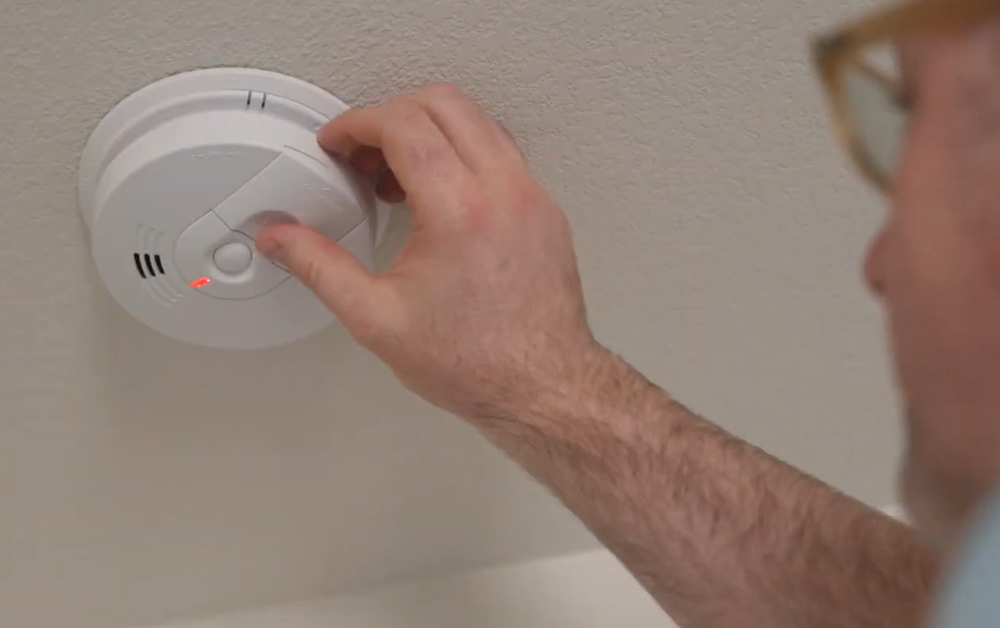
Press and hold the test button until you hear a loud beep. This confirms the new battery is installed correctly and the smoke detector is functioning properly.
According to our Service & Maintenance Team, testing your smoke detectors after every battery replacement is one of the simplest ways to ensure they’re ready to perform when you need them most.
How to Change Batteries in a Thermostat
Many digital thermostats use batteries to power their display and maintain settings.
Step 1: Turn off your HVAC system.
Before replacing thermostat batteries, turn off your heating and cooling system to help prevent electrical issues.
Step 2: Locate the Battery Compartment
Battery compartments are commonly found:
- Along the side of the thermostat
- Inside a small battery slot
- Behind the thermostat cover
Step 3: Replace the Batteries
Most thermostats use:
- AA batteries
- AAA batteries
Install the new batteries, making sure the polarity matches the markings inside the compartment.
Step 4: Restore Power and Test
Turn your HVAC system back on and verify that:
- The thermostat display powers up
- Temperature settings are visible
- The system responds properly
If everything is working normally, you’re all set.
How to Change Batteries in a Smart Door Lock
Smart locks provide convenience and security, but they depend on battery power to maintain remote functionality. Most smart locks will alert you when battery levels are low through a mobile app notification, flashing light, or warning message.
Step 1: Remove the Battery Cover
The battery compartment is usually located on the interior side of the door. Most covers slide off similarly to a television remote control battery cover.
Step 2: Remove the Old Batteries
Many smart locks use four AA batteries, Some models may use a different battery type, so check your manufacturer’s instructions if you’re unsure.
Step 3: Install New Batteries
Insert the batteries according to the positive (+) and negative (-) markings inside the compartment.
Step 4: Reattach the Cover
Slide or snap the battery cover securely back into place.
Step 5: Test the Lock
Verify that the lock is working properly by:
- Locking and unlocking with the keypad
- Using your physical key
- Testing through the mobile app
Successful operation confirms the batteries were installed correctly.
Battery Tips for Better Performance
To help your devices perform their best, Progress Residential Service Technicians recommend the following battery best practices:
- Use high-quality alkaline batteries whenever possible, as these generally provide the most reliable performance for smoke detectors, thermostats, and smart locks.
- Avoid mixing old and new batteries.
- Replace all batteries in a device at the same time.
- Check battery expiration dates before installation.
- Avoid using rechargeable batteries unless specifically recommended by the device manufacturer.
Replacing batteries is one of the simplest ways to keep your home’s safety devices and smart technology operating properly. A few minutes of routine maintenance can help ensure your smoke detectors are ready in an emergency, your thermostat keeps your home comfortable, and your smart locks continue protecting your home without interruption.
Frequently Asked Questions
How often should I replace smoke detector batteries?
Our Service Technicians recommend replacing smoke detector batteries at least once a year, or whenever you hear a low-battery chirp. Always test the detector after installing new batteries to ensure it works.
What type of batteries do smoke detectors use?
Most smoke detectors use either 9-volt batteries or AA batteries, though battery requirements can vary by model. Check your device’s label or owner’s manual for the correct battery type.
What happens if thermostat batteries die?
If thermostat batteries become depleted, the display may go blank and you may lose the ability to control your home’s heating and cooling settings. Replacing the batteries promptly can help prevent interruptions.
Can I use rechargeable batteries in smoke detectors, thermostats, or smart locks?
Unless the manufacturer specifically recommends them, Progress Residential service technicians suggest using high-quality alkaline batteries for the most reliable performance.
How do I know when my smart lock batteries are low?
Most smart locks provide low-battery warnings through a mobile app notification, flashing light, audible alert, or message on the keypad. It’s best to replace the batteries as soon as you receive a warning.
Why is my smoke detector still beeping after I changed the battery?
If a smoke detector continues beeping after a battery replacement, check that the battery is installed correctly, the battery compartment is fully closed, and the detector is securely attached to its mounting bracket. If the issue persists, consult the manufacturer’s troubleshooting guide.
If you’re a Progress Residential resident and your smoke detector continues beeping after troubleshooting, submit a service request via your Progress Home+ mobile app.
If you’d rather follow along with a video demonstration, check out our YouTube guide that walks you through changing batteries in smoke detectors, thermostats, and smart locks step by step.